
Personal Groupware


Frequently asked Questions

  • Invalid page! error
  • Error: You were locked by Yahoo
  • Laptop trouble
  • PG Offline without Yahoo ID?
  • Local messages & Web messages?
  • Duplicate attachments?
  • Will Importing overwrite my files?
  • Runtime error 339 Component DHTMLED.OCX is either missing or invalid"
  • "Error : The HTTP redirect request failed"
  • "Error : The server name or address could not be resolved"
  • "Error information: Index out of bounds"
  • Can't find an answer? ICQ me !

    PG Offline 330672749


    .


    Q.     With some groups I get the error 'Invalid page format!' when I try to download messages.

    A.     This can have 6 possible causes:

    1) Skip Authorization is switched on.
    2) You have downloaded more than Yahoo allows in a day (usually about 6000 messages).
    3) Yahoo has altered the format of the groups page.
    4) Yahoo has introduced a 2nd login screen which PG Offline does not recognise this.
    5) Your login details are incorrect.
    6) You do not have the latest version.


    1. PG Offline performs a login for each and every group you own when you do
    a 'Refresh Groups' ie PG Offline does a login (using the login parameters you have set
    for that group) before it gets your messages from that group. If you set Skip
    Authorization on (ie check the checkbox in File--> Options--> Workflow)
    PG Offline uses the cached login information from your Internet Explorer
    web browser to log you in. This means you only login once per Refresh.
    The advantage is that its slightly quicker as you save the time to do a login for every group.

    If you have Skip Authorization switched on and you have cleared your IE browser cache,
    PG Offline will not have any information to log you in with and it will fail giving
    you the invalid page format error.

    The solution is to either login to Yahoo groups using your IE browser to refresh
    the cache with your login details or switch Skip Authorization off.

    If you have multiple Yahoo IDs then you should log in to them all.
       

    2. Yahoo limit the number of hits to their servers to about 200 per session.
    As you can get 30 messages per hit you can get about 6000 messages before you are locked.
    Normally you will see this error as "You were locked by Yahoo" but sometimes it can show up as
    an invalid page format error.

       
    3. If Yahoo alter the format of the messages page PG Offline will not be able
    to recognise the page format and will give an invalid page format error.
    The best way to find out if this is happening is to go to the PG Offline
    Users Forum http://www.personalgroupware.com/smf/index.php and look to see if other users
    are reporting problems. If the Yahoo format has changed you will not be alone in noticing it.
    Normally we try to issue a patch for format changes within 2 working days.

    4. Yahoo has taken to randomly serving a second confirmation page, which
    PG Offline does not recognise, after the first login screen. If you only login once (ie Skip Authorization ON)
    you are much less likely to be served this page.

    5. Your login details are incorrect... Check your login details. Please also ensure that your password
    & username do not contain non-alphanumeric characters (like £,$,%,&).

    6. You have the wrong version... please check the here for the latest version.


    Q.     I am seeing the message   'Error: You were locked by Yahoo'   when I try to download groups. Typically this happens after I have downloaded 20000 - 50000 messages.

    A.     Yahoo limits the activity of individual users by logging hits on their server from your IP address. Once you have fully downloaded your group & are only doing regular refreshes this wont be an issue.
    If you are trying to make an archive of your group for the first time you should try these suggestions:

    1. Your group may already be archived and available free on the Downloads page.
    If you don't see your group archive in that list you can send a polite email to your moderator, asking him to request that it be made available. Moderator requests should be emailed here info@personalgroupware.com
       
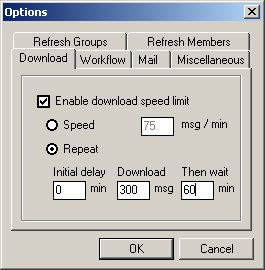
    2. PG Offline allows you to either throttle your download speed or (recommended)
    perform a 'download, wait, repeat' cycle. This functionality is available from File--> Options --> Download.
    We recommend setting values like this
       
    3. If you do get blocked, the length of time the block is imposed is related (in part) to how long PG Offline continues to
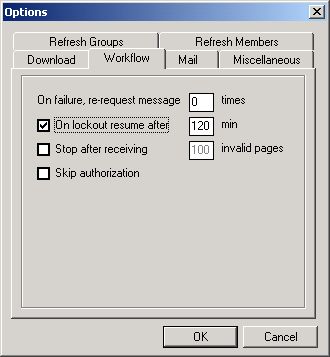
    request messages after it has been blocked. PG Offline automatically detects the locked out condition & can be set to automatically resume a download after a user defined period.


    Q.     Can I use PG Offline without a Yahoo ID?

    A.     No. You will need both a Yahoo ID & a current membership for any group you wish to download or import as a file.

    Q.     I left my laptop on overnight to download groups & I came back in the morning to a Blue Screen!

    A.     Switch off your power saving mode.
    Your laptop powered down the hard disk while PG Offline was still running.


    Q.     The number of 'Local messages' & 'Web messages' does not tally on some groups.

    A.     This is correct. Some groups, particularily the bigger groups may have either archived off earlier messages or particular messages may have been deleted by the group moderator. This leads to discrepancies between the highest message number and the actual number of available web messages.


    Q.     How does PG Offline handle duplicate attachment filenames?

    A.     PG Offline handles attachments by generating random strings & adding them onto the name along with an identifier for duplicates. The format of this is :

    (original name)rad(five digit random hex number)

    so a duplicate of 'image001' might become 'image001radEF452'.
    PG Offline holds the original & new name of the attachment in the ygr_(groupname)_Att table.


    Q.     When I import an archive file & it has missing attachments, will these invalid attachment links overwrite valid attachment links in my database?

    A.     Not from version 2.0.128 onwards. 2.0.128's main new feature is that it does an intelligent merge when importing archives. If the incoming message has a valid attachment link it will overwrite a message with an invalid attachment link. If the incoming message has an invalid attachment link, it will not overwrite a message with a valid attachment link.
    Versions prior to 2.0.128 will allow valid links to be overwritten.
    Visit the download page here for upgrade patches.


    Q. What should I do if I see "Runtime error 339 Component DHTMLED.OCX is either missing or invalid" when installing PG Offline?

    A.     DHTMLED.OCX is an Internet Explorer file used by PG Offline.
    Occasionally it does not register correctly, or the currently installed version does not work with PG Offline.
    Check for the presence of the file dhtmled.ocx in the directory C:\Windows\System32.
    If the file is present, run command (Start -> Run) regsvr32.exe C:\Windows\System32\dhtmled.ocx.
    If this does not help, it will be necessary to reinstall Internet Explorer. If neither of those two solutions work, you have an error in your system. I have had a user report that they fixed this by running Ontrack Fix It utilies available here


    Q. What should I do if I see "Error : The HTTP redirect request failed"?

    A.     The Yahoo groups service is busy. Try your download again later.


    Q. What should I do if I see "Error : The server name or address could not be resolved"?

    A.     This can have 4 possible causes:

    1. You are running a Firewall & you have not given PG Offline permission to access the Internet.
       
    2. You are not connected to the Internet... check your modem & wiring.
       
    3. Your ISP's DNS server is down... contact your ISP.
       
    4. Yahoo's servers are down... wait & try again later.


    Q. What should I do if I see "Error information: Index out of bounds"?

    A.     This is caused by change of locales settings or corrupted registry settings. Follow these steps:

    1. Uninstall PG Offline
       
    2. Manually delete [HKEY_CURRENT_USER\Software\VB and VBA Program Settings\PG Offline] from the registry. You can use Start--> Run--> regedit to edit the registry. See a step by step guide here
       
    3. Re-install PG Offline back to the folder you first installed it to.